
For residential care organizations

The complete digital system for residential care teams.

Rosters, clock-in, pay, staff records, hiring and incidents, all in one place. Built for the way group homes and residential care really run.

The call is for scoping. Setup is quoted after it.

Product tour video coming soon
An example day

A Tuesday, handled.

Sunday night rosters, 6 a.m. calls and the paperwork between a yes and a first shift, taken off your plate.

  1. 6:02 a.m.

    A call-off comes in.

    Cover starts straight away, with no group text.

    Call-offBen, 7:00 to 15:00
    Cover started
  2. 6:09 a.m.

    The shift is covered.

    The system suggests the best match, and the shift is filled.

    Open shift filledChloe, best match
    Confirmed
  3. 9:00 a.m.

    Everyone clocks in at the house.

    You see who is in, who is due and who is late, without calling.

    Live boardCedar House: 4 in, 1 due
    On time
  4. 1:30 p.m.

    A certificate is renewed.

    A photo from a phone puts it on file before it lapses.

    Certificate renewedCPR, photo sent
    On file
  5. 4:45 p.m.

    An incident is reported.

    The right people are told straight away.

    Incident reportedFrom the phone, on the shift
    Supervisor told
  6. 11:00 p.m.

    The handover is written.

    The next shift reads it in the app, not on paper.

    Handover writtenNight shift, Cedar House
    Saved

An example day. Times and names are invented.

What you get back

Six jobs that stop being yours.

One record runs through all six, so nothing is typed twice.

Staff scheduling and rotations

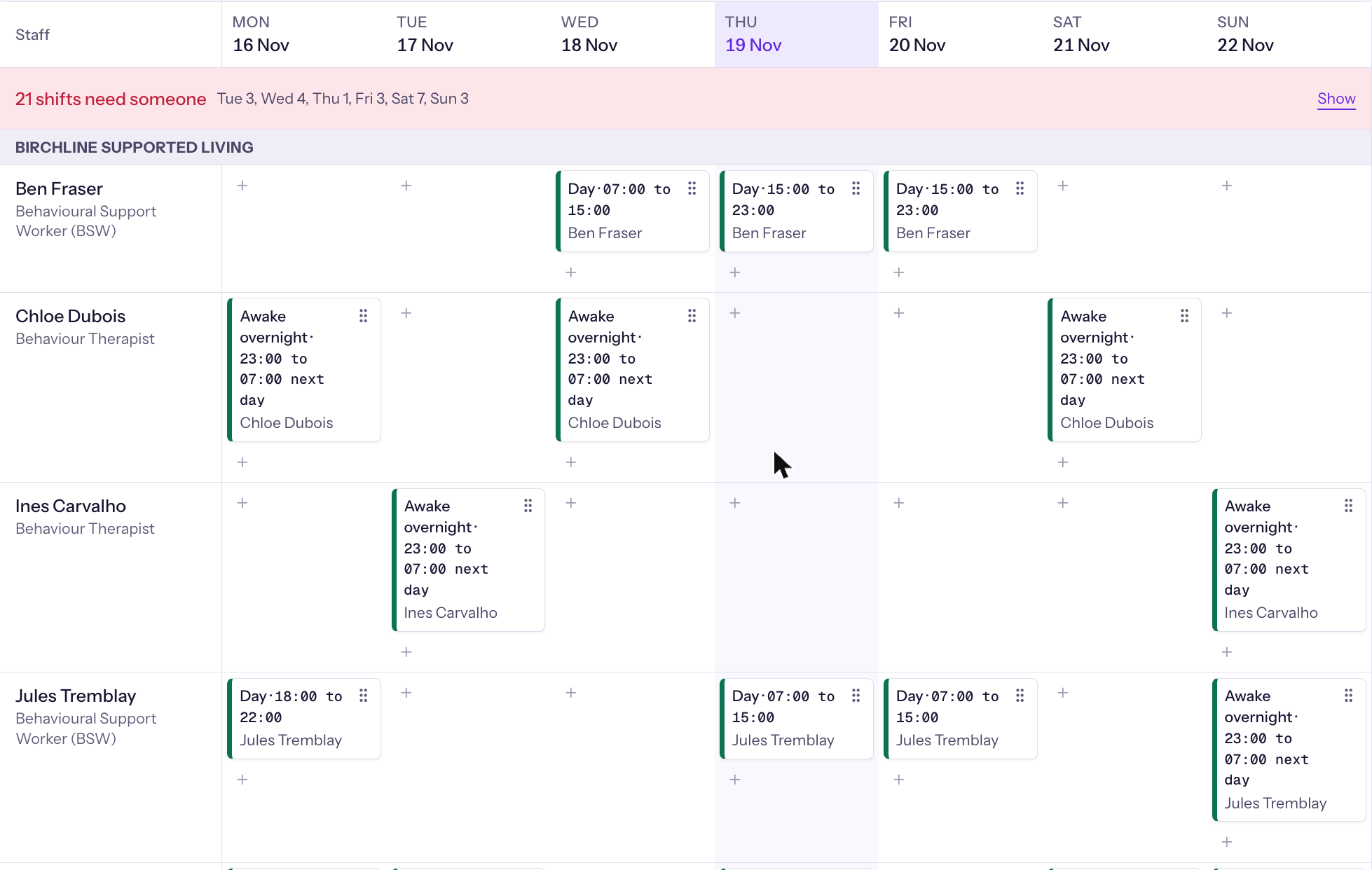
Build the week once

Build the week once and let it repeat.

  • Standing rotations are generated forward for every house.
  • Every placement is checked against your rules, and anything that breaks one is refused.
  • Each shift shows suggested staff, best match first.
  • Work in draft, then publish, and staff confirm they have seen it.
More detail: Scheduling

Open shifts, swaps and call-offs

Cover a call-off without a group text

A call-off starts cover straight away.

  • Open shifts go to a board and staff claim them from the phone.
  • Swaps are checked against the same rules.
  • You see a gap coming before the week arrives, with a forecast of short weeks for each house.

Payroll files from clock-ins

Hours become pay-ready sheets

Staff clock in on their own phone, and the system confirms they are at the house.

  • Hours build themselves into one timesheet per person.
  • You review, approve and lock the period, and approved hours export as spreadsheets for your payroll team.
  • Pay rules are set up for your organization.

Certificate tracking and renewals

Know who can work before the shift

Every certificate each role needs is on file with proof.

  • Staff photograph their own renewals from the phone.
  • You get a warning before anything expires, and someone whose certificate has lapsed is not scheduled until a renewal is on file.
More detail: Credentials

Hiring to first shift

Hire without the paperwork chase

Post a vacancy, take applications, and move each candidate from applied to hired.

  • An accepted offer carries across into the new staff record.
  • Onboarding, the staff photo and the printed ID card happen in the same place, so a new person is ready for their first shift without a second system.

Live attendance, incidents and handover

Know what happened overnight

A live board shows who is in each house now, who is due, and who has not clocked out.

  • Late and no-show alerts reach the supervisor straight away.
  • Incidents are reported from the phone, the right people are told straight away, and a supervisor takes each one through to closure.
  • Shift handover is written in the app, not on paper.

See every feature

Who sees what

One system. Three views.

You and the office Every house at a glance, with the decisions that need you.

The weekly roster, with each person on a row and each day in a column.

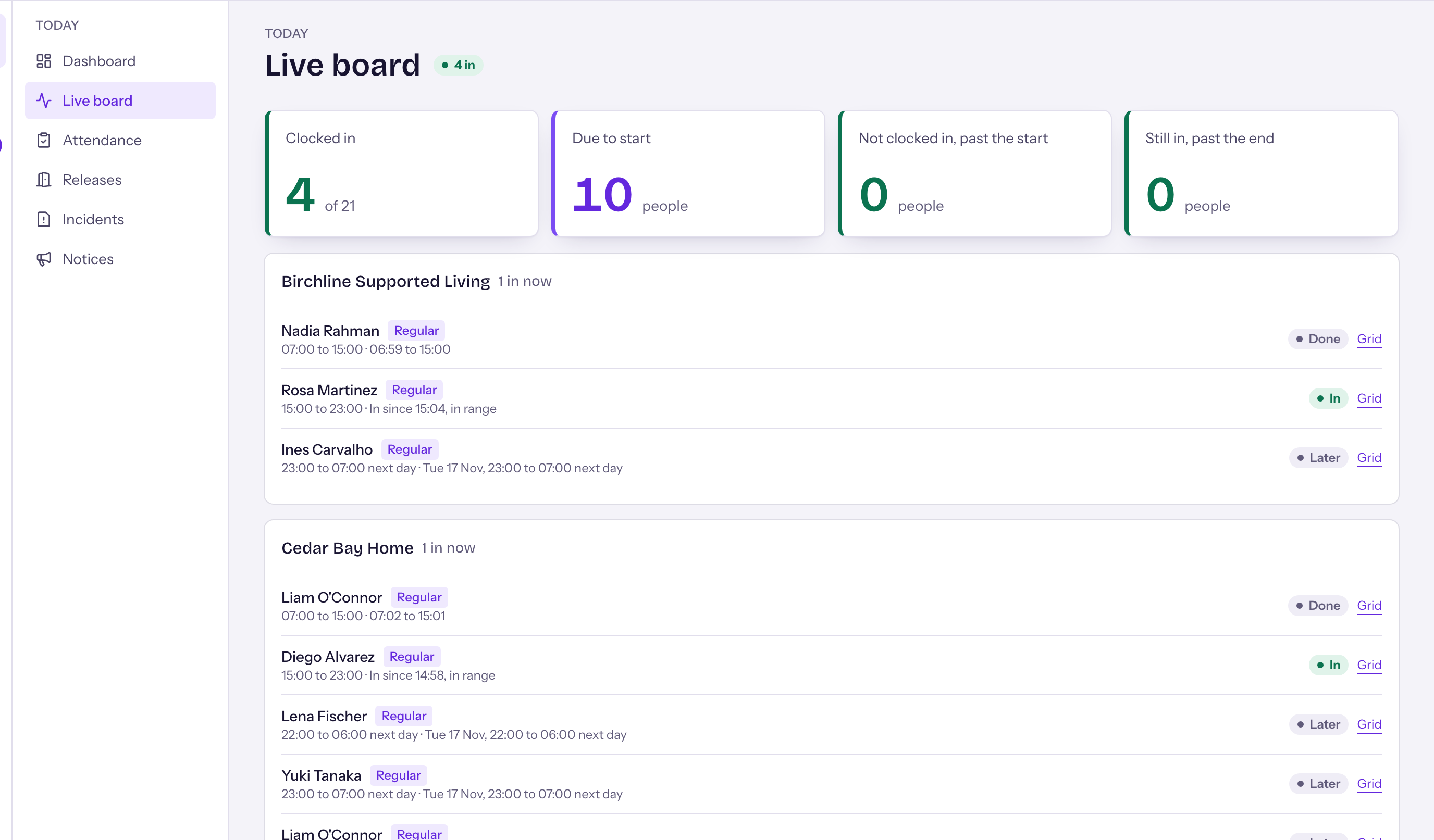
Supervisors Who is on shift, who is late, and what needs a decision now.

The live attendance board, listing each house with who is clocked in, due or late.

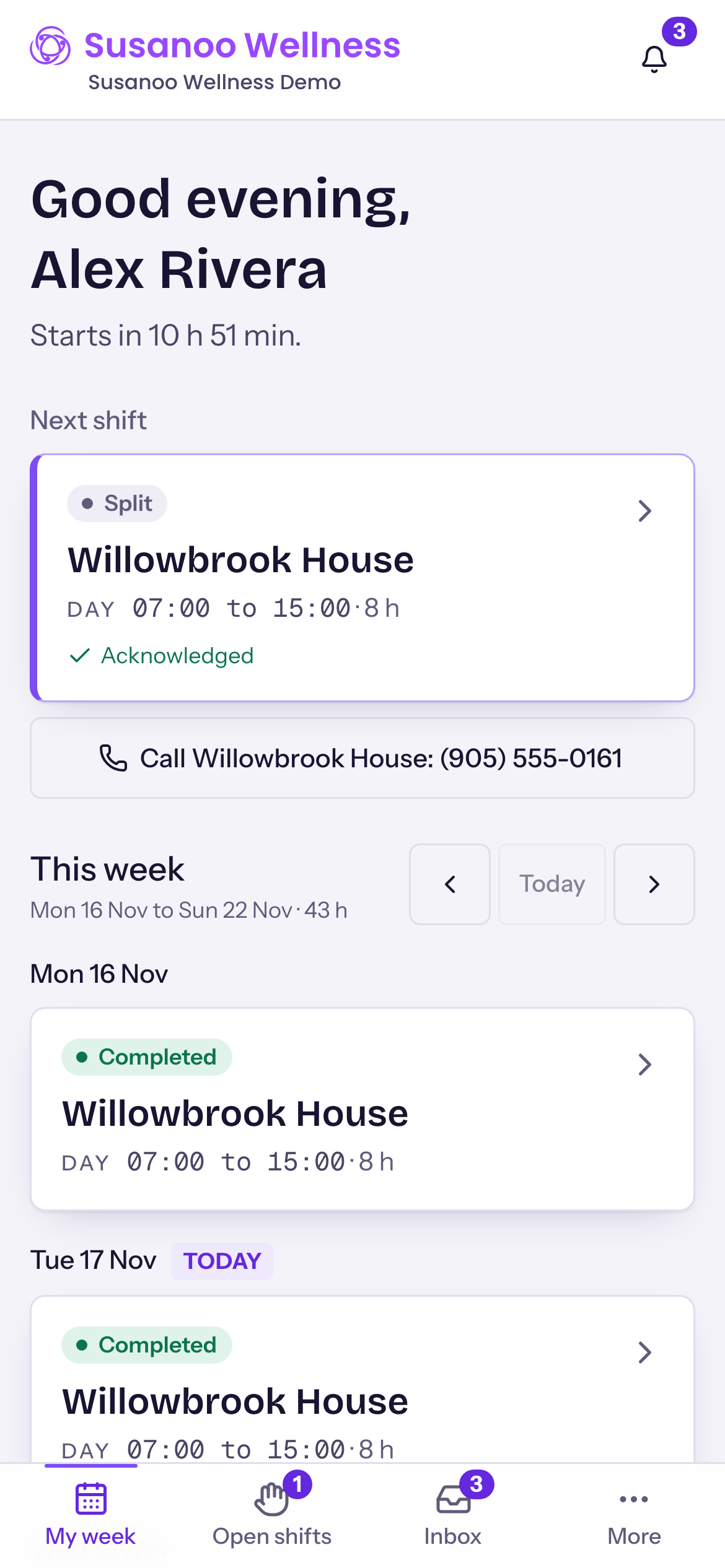
Support workers Their shifts, clock-in, time off and incident reporting, from the phone.

The staff phone view, showing today's shifts with the next shift first.
Staff on their phone

Everything staff need, on the phone they already carry.

Staff open it in their phone’s browser. Nothing to install, and a dark mode for night shifts.

A Susanoo Wellness staff app is coming very soon.

The staff phone view, showing today's shifts with the next shift first. It also has a dark mode.
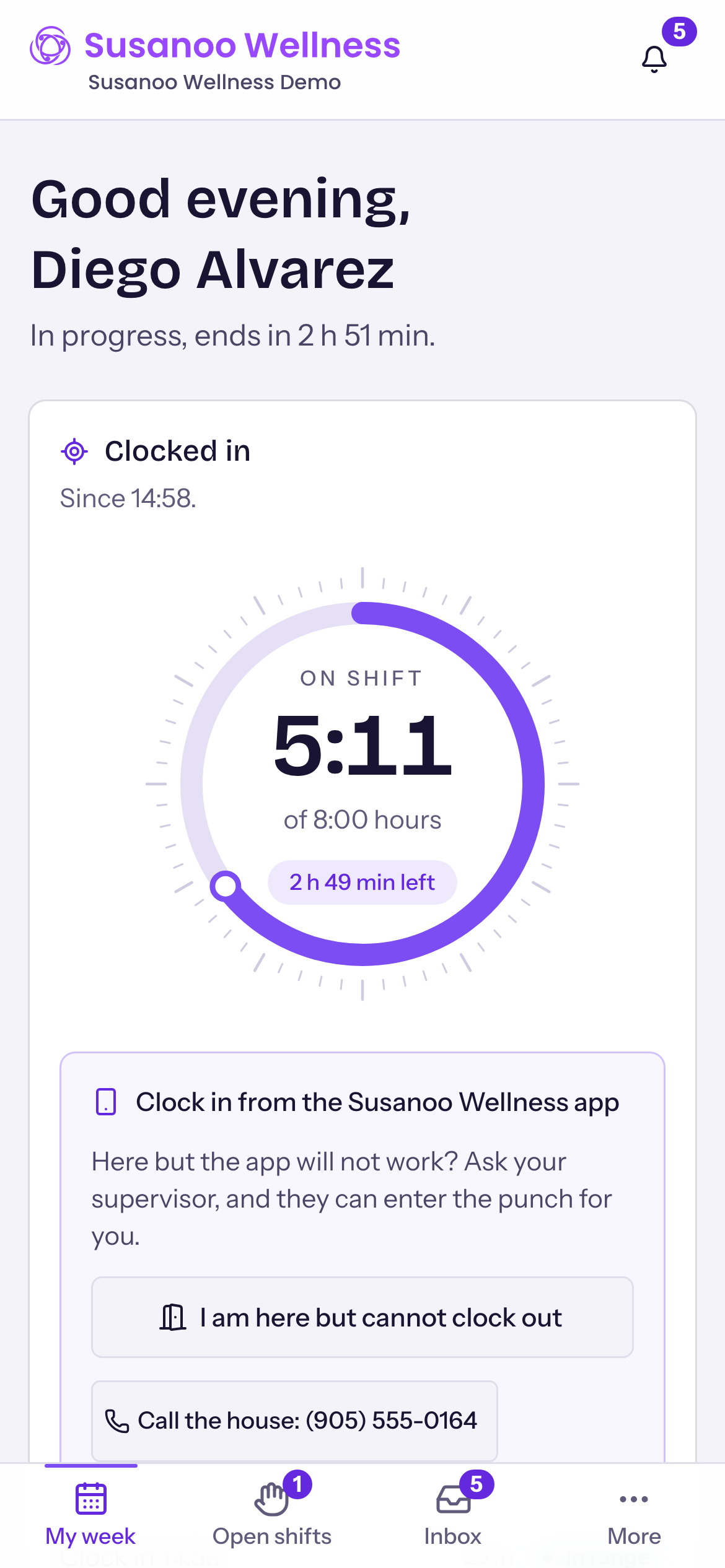
Day and night view
The phone clock-in screen at the house, with one large button to clock in.
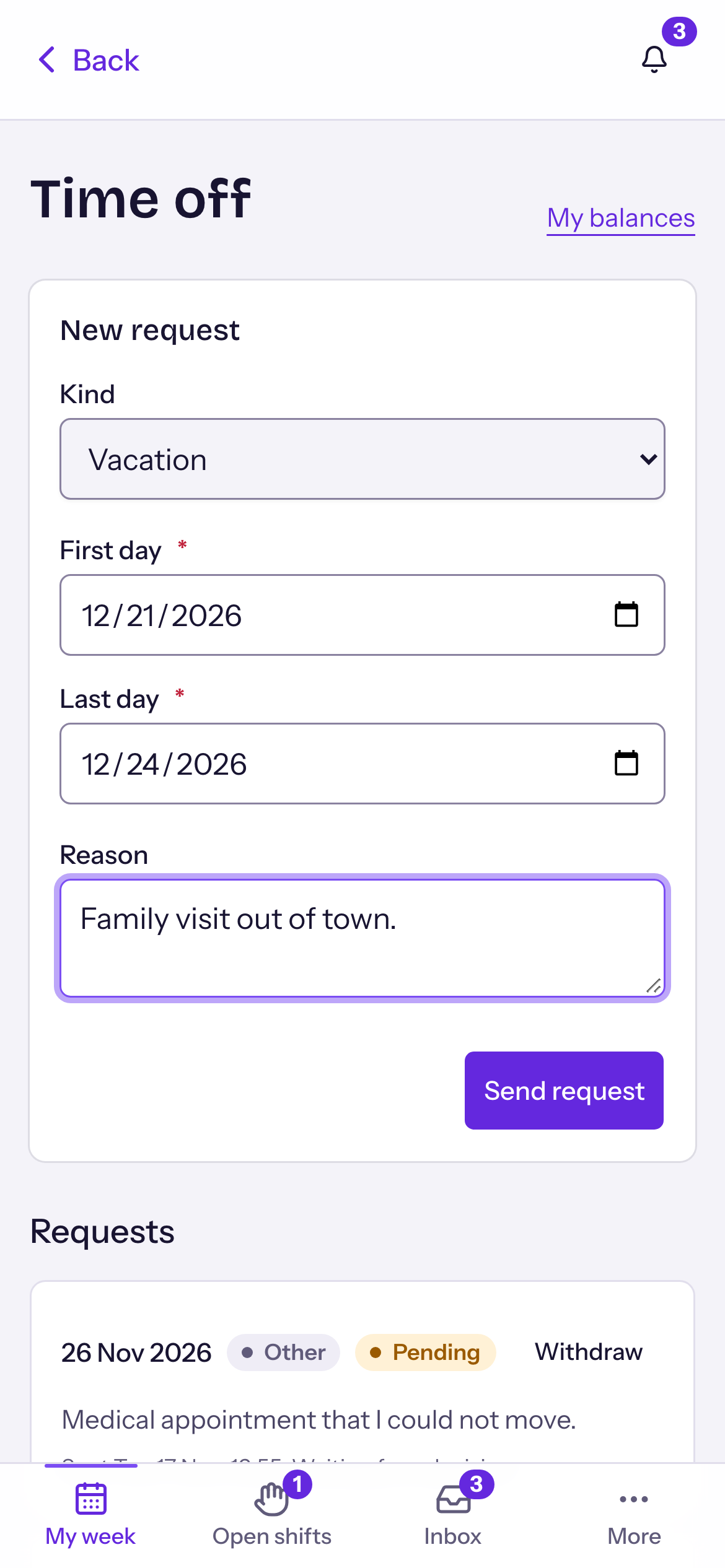
A time off request on a phone, with the dates chosen and a send button.
Security and backups

Your data, kept safe.

Read the full security and backups detail
  • Backups

    Backed up every day and encrypted.

  • In Canada

    Stored in Canada, kept apart from every other organization.

  • Sign-in

    Two-step sign-in for everyone, invitation only.

  • Access

    Access by role, switched on or off for one person.

  • The record

    Every change recorded.

Built around your organization

Set up the way you work.

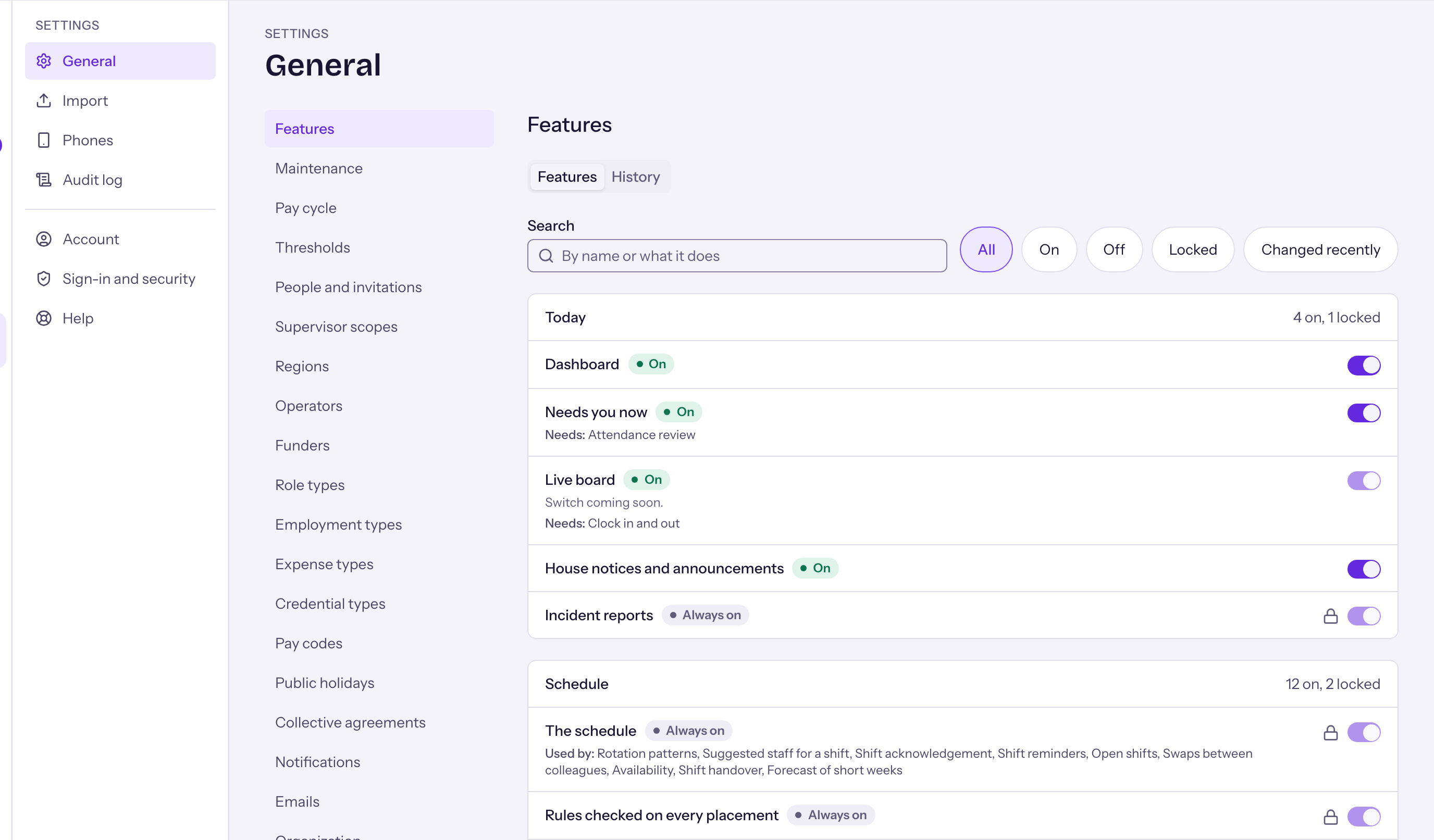
Every feature can be switched on or off for your organization, and the office changes the settings behind them.

The Settings, Features screen, with a switch beside each feature that turns it on or off for the organization.
FAQ

Questions we are asked

How much of my week does this take back?

The roster, the gap cover, the payroll build, the certificate chasing and the hiring paperwork. We do not promise a number of hours, because it depends on your houses. On the discovery call we map where your hours go today.

Do staff have to install anything?

No. Susanoo Wellness opens in the phone’s browser on iPhone and Android, and on a computer. A staff app is coming very soon.

Will my staff actually use it?

It opens in the phone’s browser with nothing to install. The screens use large text and one clear action at a time, and staff do their everyday jobs from the phone: see shifts, claim open shifts, clock in, ask for time off and report an incident.

Does it replace our payroll provider?

No. It prepares approved hours as spreadsheets for your payroll team. Pay rules are set up for your organization.

Where is our data, and is it backed up?

Your data is held in Canada. A full backup runs every day and is encrypted before it is stored. The security page explains each step.

Is there a setup fee?

Yes. We quote it after the discovery call, based on your organization. The call is for scoping and is not the setup. Anything beyond the standard setup is quoted separately, so you know the cost before work starts.

Can we bring in our current roster and staff records?

Yes. We load your roster and certificates from your spreadsheets as part of setup, so you do not retype them.

Can we start with one house?

Yes. One house starts first, so your team learns it with support, and you roll it out to the other houses when you are ready.

What if I only have two houses?

Start with one. You add the other when you are ready.

What happens when a certificate expires?

You get a warning before it runs out. Once it has lapsed, the system will not schedule that person until a renewal is on file.

Can it be set up for how we work?

Yes. Every feature can be switched on or off for your organization, and the office can change the settings behind them.

Do new hires get a photo and ID card?

Yes. Each person has a staff photo, and the office can print an ID card in your organization’s colours and logo.

Get in touch

See it for your houses.

Send us a few details and we will get back to you. Or book a discovery call and pick a time to talk.

  • 30 minutesA short call, no preparation.
  • On videoPick a time, Monday to Friday.
  • Scoping, not setupYou know the cost before any work starts.

or, if you would rather talk

Book the discovery call